

The Summary tab provides an overview of the TCO (Total Cost of Ownership) analysis, which is a key component of the overall cloud assessment. This page consolidates the most critical data points from the compute, storage, and networking tabs into a single, comprehensive table, making it easy to review the full TCO for each asset.
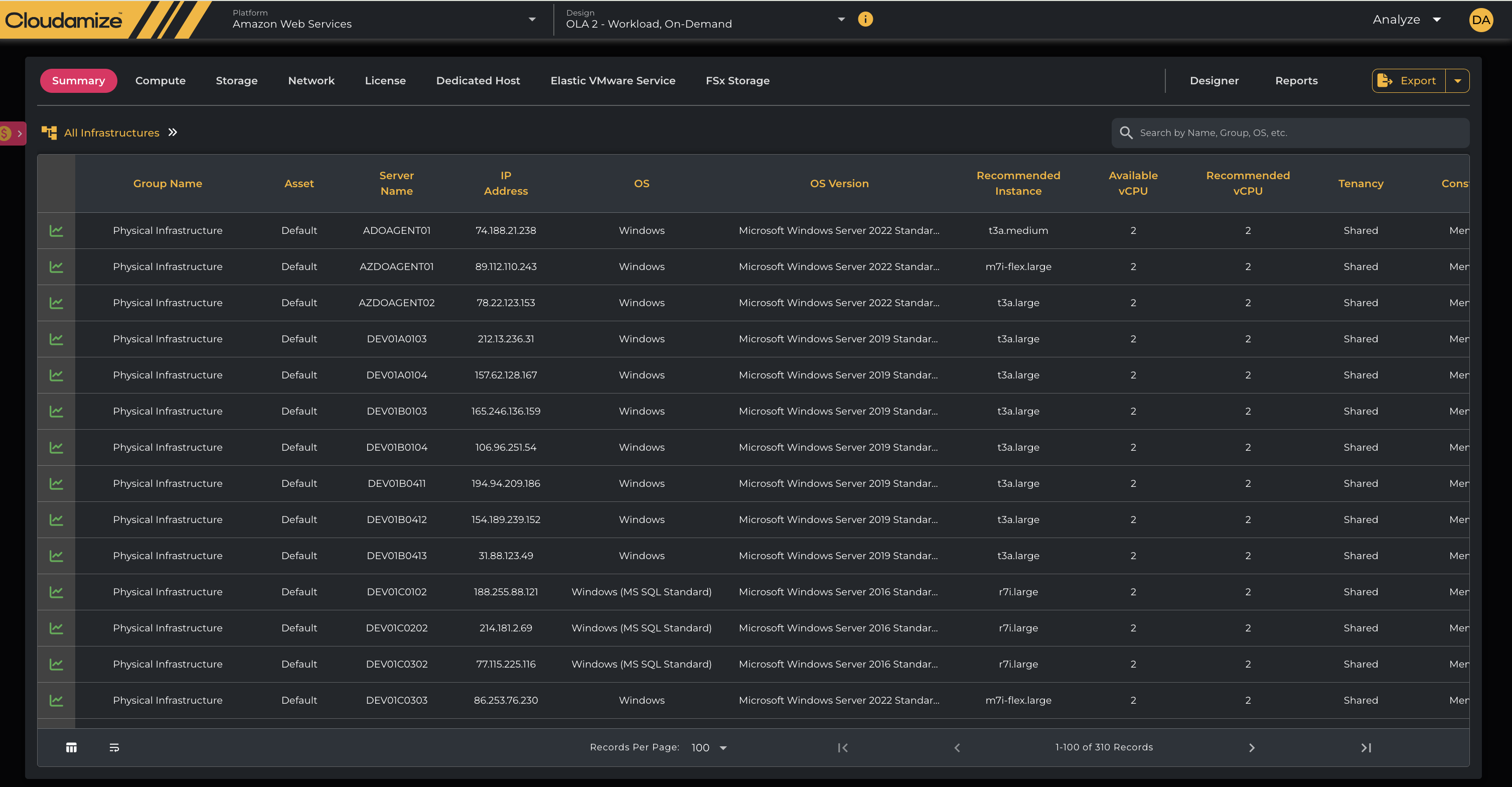
Detailed TCO and Asset Table
The main component is a table that provides a holistic view of each asset's TCO and its corresponding cloud recommendations. This table serves as a single source for all key metrics.
|
Column Header |
Description |
|
Group Name |
User-defined group name for the asset, used for logical organization. |
|
Asset |
A unique identifier or name for the asset. |
|
Server Name |
Hostname of the server. |
|
IP Address |
IP address of the server. |
|
OS |
The installed operating system. |
|
OS Version |
The specific version of the operating system. |
|
Recommended Instance |
Suggested cloud instance type for the workload is based on performance data. |
|
Available vCPU |
Number of virtual CPUs available on the recommended instance. |
|
Recommended vCPU |
Optimal number of virtual CPUs required for the workload. |
|
Tenancy |
Specifies if the recommended instance is Shared or Dedicated. |
|
Constraint |
Any specific constraints on the server, such as licensing restrictions. |
|
MS SQL Edition |
Detected edition of Microsoft SQL Server. |
|
SQL Version |
The version of SQL Server. |
|
Is Graviton Eligible? |
A status indicator showing a green checkmark for ARM-compatible systems or a dash for ineligible configurations. |
|
Graviton Application Compatibility Score (%) |
A color-coded percentage representing the ease of migrating the software stack to Graviton. The number represents what % out of total packages are graviton compatible. Users can click the download icon within this cell to export a detailed Compatibility Report. |
|
Graviton Supported Application Count |
The total number of detected software packages confirmed to be ARM-compatible. |
|
Graviton Unsupported Application Count |
The count of software packages that lack native support for Graviton processors. |
|
Total Cost ($) |
Total projected annual cost for an instance( including compute, storage, network and License). |
|
Compute Cost ($) |
The portion of the total cost attributed to the compute (CPU/RAM) component. |
|
Storage Cost ($) |
The portion of the total cost attributed to storage. |
|
Network Cost ($) |
The portion of the total cost attributed to networking. |
|
License Cost($) |
It indicates license cost for an instance. |
|
Data Source |
Source from which the data was collected (e.g., vCenter, Hyper-V, physical host). |
|
Collection Time Span |
The duration over which the performance data was collected. |
|
Performance (x-times) |
A multiplier indicating the performance improvement or degradation of the recommended instance relative to the current one. |
|
ID (server name + uid) |
A unique identifier for the server. |
Is Graviton Eligible?
Below are the minimum supported Linux OS versions for Graviton based instances. “Any Linux server that does not meet the minimum OS version shows a red cross mark, whereas the status indicator shows a green checkmark for ARM-compatible servers that meet the minimum OS version." Please refer this updated OS list.
|
OS Name |
Minimum recommended Linux kernel version for Graviton |
|---|---|
|
Amazon Linux 2023 |
All supported kernels |
|
Amazon Linux 2 |
>= 4.14.273-207.502.amzn2, >= 5.4.186-102.354.amzn2, or >= 5.10.106-102.504.amzn2 |
|
Ubuntu 24.04 |
All supported kernels |
|
Ubuntu 22.04 |
All supported kernels |
|
Ubuntu 20.04 |
>= 5.4.0-1047-aws, >= 5.8.0-1034-aws, >= 5.11.0-1009-aws |
|
Ubuntu 18.04 |
>= 4.15.0-1101-aws, >= 5.4.0-1047-aws |
|
Redhat Entreprise Linux 8 |
>= 4.18.0-305.10 |
NOTE: Microsoft Windows Operating systems of all versions do not currently support Graviton based instances.
Export Functionality
The Export button, located at the top-right of the dashboard, allows users to download the data from the current view. This feature is crucial for sharing assessment results, creating custom reports, or archiving data outside of the Cloudamize platform.
The Summary tab is a crucial tool for informed decision-making at the highest level. It consolidates all TCO data into a single, actionable report, allowing users to assess the costs quickly and recommended configurations for their entire infrastructure on a per-asset basis.
If you have any queries, please get in touch with the helpdesk via our Helpdesk Portal or by email at helpdesk@cloudamize.com.