

🧩 Overview
Cloudamize MCP Server is a secure integration layer that connects Cloudamize APIs with:
-
AI assistants (Cursor, Claude Desktop, etc.)
-
AI agents
-
Enterprise agentic systems (AWS Transform, Kiro, workflows)
It provides access to:
-
Migration plans
-
Infrastructure assessment
-
Cost (TCO) insights
-
Recommendations
-
Migration grouping
🌐 Deployment Options
|
Mode |
Endpoint |
Use |
|---|---|---|
|
🌍 Hosted |
Recommended |
|
|
🐳 Local |
Restricted environments |
🌍 Hosted MCP Setup
🔑 Generate Token (Valid for 12 hours)
How to Use cmz-auth.sh
-
Save the script as
cmz-auth.shin your working directory. -
Make it executable:
bash
chmod +x cmz-auth.sh
-
Run the script with your credentials:
bash
API_USER='your-email@example.com' API_PASS='your-password' ./cmz-auth.sh
-
If multiple engagements are found, the script lists available Customer IDs — enter the relevant Customer ID when prompted.
-
Token is returned on stdout
🐳 Local MCP Setup (Docker)
Pull image from ECR
docker pull public.ecr.aws/m5z6i3j5/cloudamize/cloudamize-mcp/prod
docker run -d \
  --name cmz-mcp-server \
  -p 8080:8080 \
  -e MODE=http \
  -e PRECLOUD_BASE_URL=https://precloud-api.cloudamize.com \
  -e GRAPH_BASE_URL=https://mp-api.cloudamize.com/api/v1 \
  -e MIGRATOR_BASE_URL=https://migrator-api.cloudamize.com \
  720780545726.dkr.ecr.eu-central-1.amazonaws.com/cmz-mcp-server/prod:latest
🧪 Example MCP Call (Hosted)
1. Initialize
curl -i https://mcp.cloudamize.com \
  -H 'Authorization: Bearer $TOKEN' \
  -H 'Content-Type: application/json' \
  -d '{
    "jsonrpc": "2.0",
    "id": 1,
    "method": "initialize",
    "params": {
      "protocolVersion": "2025-11-25",
      "capabilities": {},
      "clientInfo": { "name": "curl", "version": "1.0.0" }
    }
  }'
-
Save the response header
Mcp-Session-Id(example:mcp-session-xxxxxxxx-...). -
Response body is JSON-RPC with server capabilities.
2. Initialized notification (recommended for spec-compliant clients)
Many MCP clients send this once after a successful initialize:
SESSION_ID='<Mcp-Session-Id from step 1>'

curl -i https://mcp.cloudamize.com \
  -H 'Authorization: Bearer $TOKEN' \
  -H "Mcp-Session-Id: ${SESSION_ID}" \
  -H 'Content-Type: application/json' \
  -d '{
    "jsonrpc": "2.0",
    "method": "notifications/initialized"
  }'
-
Expect 202 Accepted (no JSON-RPC result body).
-
The cmz-mcp-server does not require this for basic
tools/list/tools/callin manual tests, but production MCP clients typically send it.
3. List tools
curl -i https://mcp.cloudamize.com \
  -H 'Authorization: Bearer $TOKEN' \
  -H "Mcp-Session-Id: ${SESSION_ID}" \
  -H 'Content-Type: application/json' \
  -d '{
    "jsonrpc": "2.0",
    "id": 2,
    "method": "tools/list"
  }'
Registered tools include (non-exhaustive): getRecommendations, getInfrastructureAssessment, getPlanInsights, getTCO, getAIGroupingDetails, getApplicationData, getObservedInfrastructure, getServerConnectivity.
4. Call a tool
curl -i https://mcp.cloudamize.com \
  -H 'Authorization: Bearer $TOKEN' \
  -H "Mcp-Session-Id: ${SESSION_ID}" \
  -H 'Content-Type: application/json' \
  -d '{
    "jsonrpc": "2.0",
    "id": 3,
    "method": "tools/call",
    "params": {
      "name": "getInfrastructureAssessment",
      "arguments": {}
    }
  }'
Using a Tool via an AI Assistant Client (Claude Desktop)
Once the MCP server is connected in a client such as Claude Desktop, tools like `getRecommendations` can be invoked with a natural-language prompt instead of raw JSON-RPC. For example, asking for FSxN storage recommendations returns a formatted breakdown pulled directly from the connected Cloudamize plan:
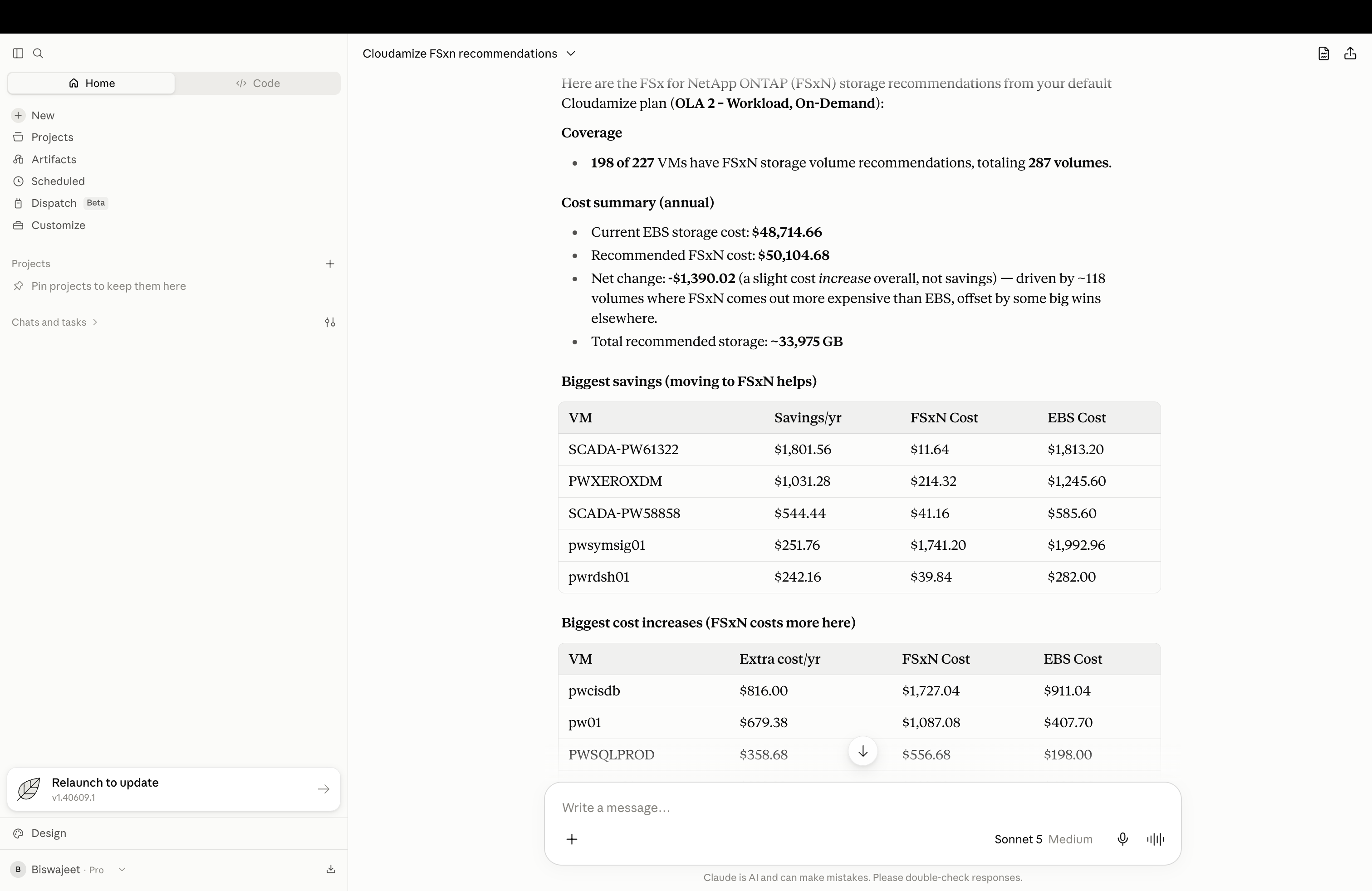
The response includes coverage (VMs with recommendations), an annual cost summary (current vs. recommended storage cost), and a breakdown of the biggest savings and cost increases per VM.
📡 Local Endpoint
http://localhost:8080/
⏳ Token Info
-
Token validity: 12 hours
-
Expired token → returns
401 Unauthorized -
Must be refreshed periodically
🔐 Auth Methods
-
Bearer Token
🧠 Architecture
AI Assistant / AI Agent
        ↓
MCP Server (Hosted / Local)
        ↓
Cloudamize APIs
⚙️ Admin Configuration
|
Variable |
Description |
|---|---|
|
MODE |
http / stdio |
|
PRECLOUD_BASE_URL |
Cloudamize API endpoint |
|
GRAPH_BASE_URL |
Graph API endpoint |
|
MIGRATOR_BASE_URL |
Migration UI data API endpoint |
|
AUTH_TOKEN |
Bearer token (stdio mode) |
📌 Summary
-
Hosted MCP is recommended:
https://mcp.cloudamize.com -
Local Docker available for restricted environments
-
Token expires every 12 hours
-
Supports AI assistants, AI agents, and enterprise agentic systems