

Overview
The Cloudamize ADC reports a success for Ping and TCP Port 22, but the connection fails with: SshOperationTimeoutException = Socket read operation has timed out after 60000 milliseconds.
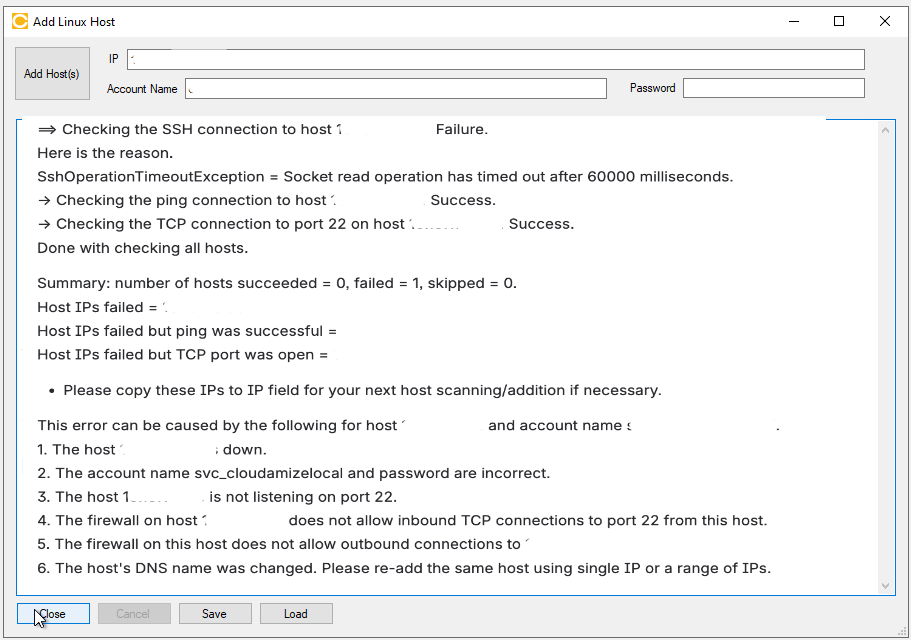
Because the TCP-22 port check succeeded but the SSH login timed out, the issue likely resides within the SSH session layer (authentication, shell initialization, or account privileges) rather than basic network connectivity.
Troubleshooting Steps
1. Validate OS & OpenSSL Version Compatibility
The Cloudamize ADC requires specific minimum versions of the Linux operating system and its cryptographic libraries to establish a secure session.
-
OpenSSL Requirement: The most critical component is OpenSSL. To ensure compatibility with the ADC's encryption methods, the target host must be running at least version 3.0.0.
-
Support Status: While older versions of Linux may occasionally work if manually updated, Cloudamize cannot guarantee performance or provide support for versions below the minimum requirements outlined in our [Installation Prerequisites].
2. Validate Account & Shell Privileges
-
Privileges: Ensure the service account belongs to the root, wheel, or sudo group. Full administrative privileges are required.
-
Shell Requirement: The ADC requires the bash shell. Confirm the login shell for the account is explicitly set to
/bin/bash.
3. Manual Verification from ADC Host
Attempt a manual connection from the ADC machine to the target host to rule out environment-specific blocks:
ssh <account_name>@<target_ip>
whoami; echo $SHELL; openssl version
Expected Result: The command should return the username, /bin/bash, and an OpenSSL version of 3.0.0 or higher.
4. Verbose Logging for Deep Analysis
If the connection still times out, use verbose logging to identify if the failure happens during the encryption handshake:
ssh -vvv <account_name>@<target_ip> "echo hello"
Note: If your target server is running an end-of-life (EOL) Linux distribution with an older OpenSSL library, the SSH socket may time out because the ADC cannot negotiate a mutually supported, secure cipher suite.
If the issue persists, please capture a screenshot of the error output and collect the log_backup.txt file from the following directory on the Cloudamize Agentless DC:
C:\Program Files (x86)\CloudamizeAgentlessDc\log_backup.txt
Please attach both the screenshot and the log file in an email to helpdesk@cloudamize.com for further investigation.
If you have any queries, please get in touch with the helpdesk via our Helpdesk Portal or by email at helpdesk@cloudamize.com.