

Overview
When attempting to connect to Linux hosts, you may see one of the following errors in the Cloudamize ADC logs or ADC UI
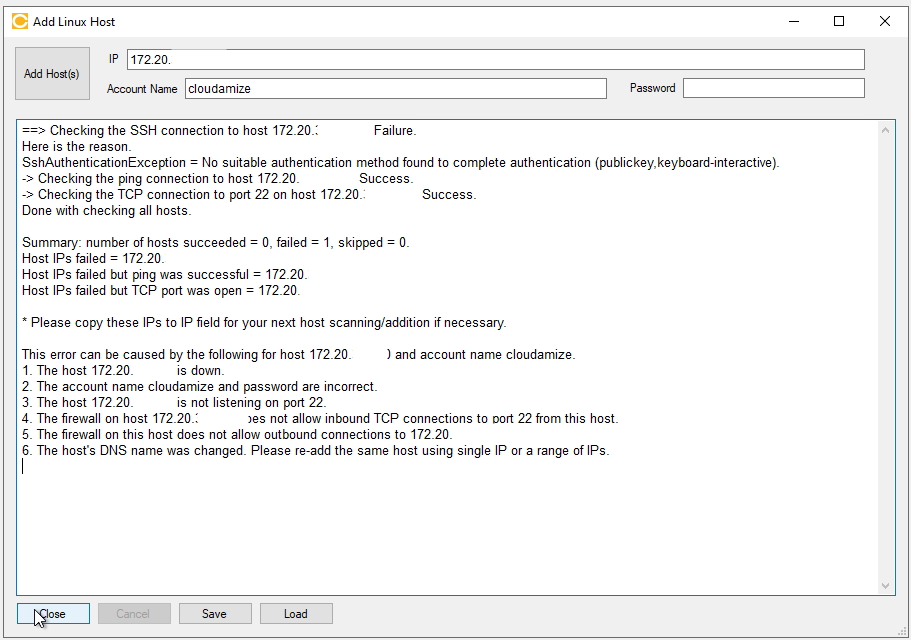
-
SshAuthenticationException = No suitable authentication method found to complete authentication (publickey,keyboard-interactive) -
SshAuthenticationException = No suitable authentication method found to complete authentication (publickey,gssapi-keyex,gssapi-with-mic,keyboard-interactive)
Root Cause
Cloudamize ADC connects to Linux servers via SSH using Password Authentication only. It does not currently support publickey (SSH keys), gssapi, or keyboard-interactive methods. These errors indicate that the target Linux server is configured to prioritize or exclusively allow these unsupported methods, causing the ADC's password-based connection attempt to be rejected.
Troubleshooting Steps
Option 1: Enable Password Authentication (Recommended for Agentless)
You must modify the SSH daemon configuration on the target Linux server to allow password-based logins.
-
Log in to the remote Linux server as a user with
sudoorrootprivileges. -
Open the SSH configuration file (usually located at
/etc/ssh/sshd_config) using a text editor:sudo vi /etc/ssh/sshd_config -
Locate the line
PasswordAuthentication. -
Change the value from
notoyes:PasswordAuthentication yes -
Save the file and exit the editor.
-
Restart the SSH daemon to apply the changes
Option 2: Use the Cloudamize Agent (Alternative)
If your organization cannot or will not enable Password Authentication due to security policies:
-
Install the Cloudamize Agent locally on the Linux server.
-
The Agent runs as a local service and does not require remote SSH authentication to collect data, bypassing the need for any SSH configuration changes.
-
You can find the Linux Agent installation instruction KB here.
Always ensure that any changes to
/etc/ssh/sshd_configcomply with your organization's security standards before implementation.
If the issue persists, please capture a screenshot of the error output and collect the log_backup.txt file from the following directory on the Cloudamize Agentless DC:
C:\Program Files (x86)\CloudamizeAgentlessDc\log_backup.txt
Please attach both the screenshot and the log file in an email to helpdesk@cloudamize.com for further investigation.
If you have any queries, please get in touch with the helpdesk via our Helpdesk Portal or by email at helpdesk@cloudamize.com.